 E-KO RIP Center
Documentation
Everything to install, use and run E-KO RIP Center: server, Mac, Linux and Windows clients, mobile app and Cloud.
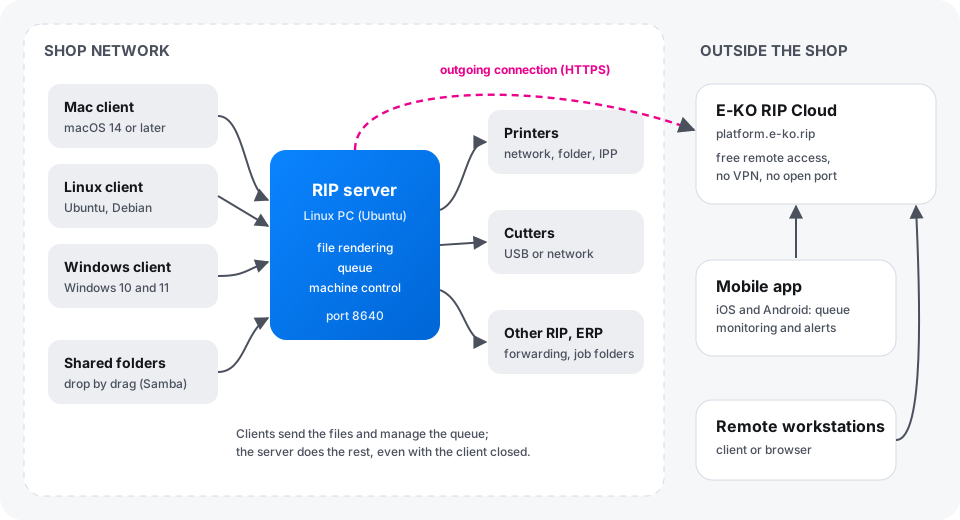
E-KO RIP Center is a free, open-source wide-format printing RIP. A server installed on a Linux PC in the print shop receives the files, calculates the renders and drives the printers and cutters. Workstations connect to it with the Mac, Linux or Windows client; the mobile app follows production; E-KO RIP Cloud gives access to the shop from outside.
Where to start
| I want to… | Read |
|---|---|
| Understand the whole system and set up a print shop step by step | Getting started |
| Install the server on a Linux PC | Install the server |
| Install the software on my Mac, Linux PC or Windows PC | Install the clients |
| Follow production on my phone | Mobile app |
| Reach the shop from home or from a customer's site | E-KO RIP Cloud |
| Send a file, print, cut, make a proof | User guide |
| Connect and set up a machine | Machines: printers, cutting plotters, cutting tables |
| Manage accounts, back up, update | Run the server |
| Understand an error message | Troubleshooting |
What to know first
- All the work is done on the server. Clients send the files and show the queue; once a file has been sent, you can close the client: rendering and printing carry on.
- One server for the whole shop. Every workstation, Mac, Linux or Windows, sees the same queue and the same machines.
- The server stays in the shop. It is never exposed to the Internet; to reach it from outside, use E-KO RIP Cloud, which is free.
- Free software. The code is public under the AGPL-3.0 licence on GitHub; there is no licence to buy and no limit on the number of workstations.
Getting help
- In the client: Report a problem… (Signaler un problème…; in the Help menu (Aide) on Mac, in the main menu on Linux) sends a description and the useful information to the team.
- By e-mail: contact@e-ko.rip.
- What is new in each version: release notes.
This documentation follows the latest published version. It is updated whenever the RIP, the clients, the mobile app or the Cloud change.
Found a mistake or something missing? Suggest a fix or write to contact@e-ko.rip.